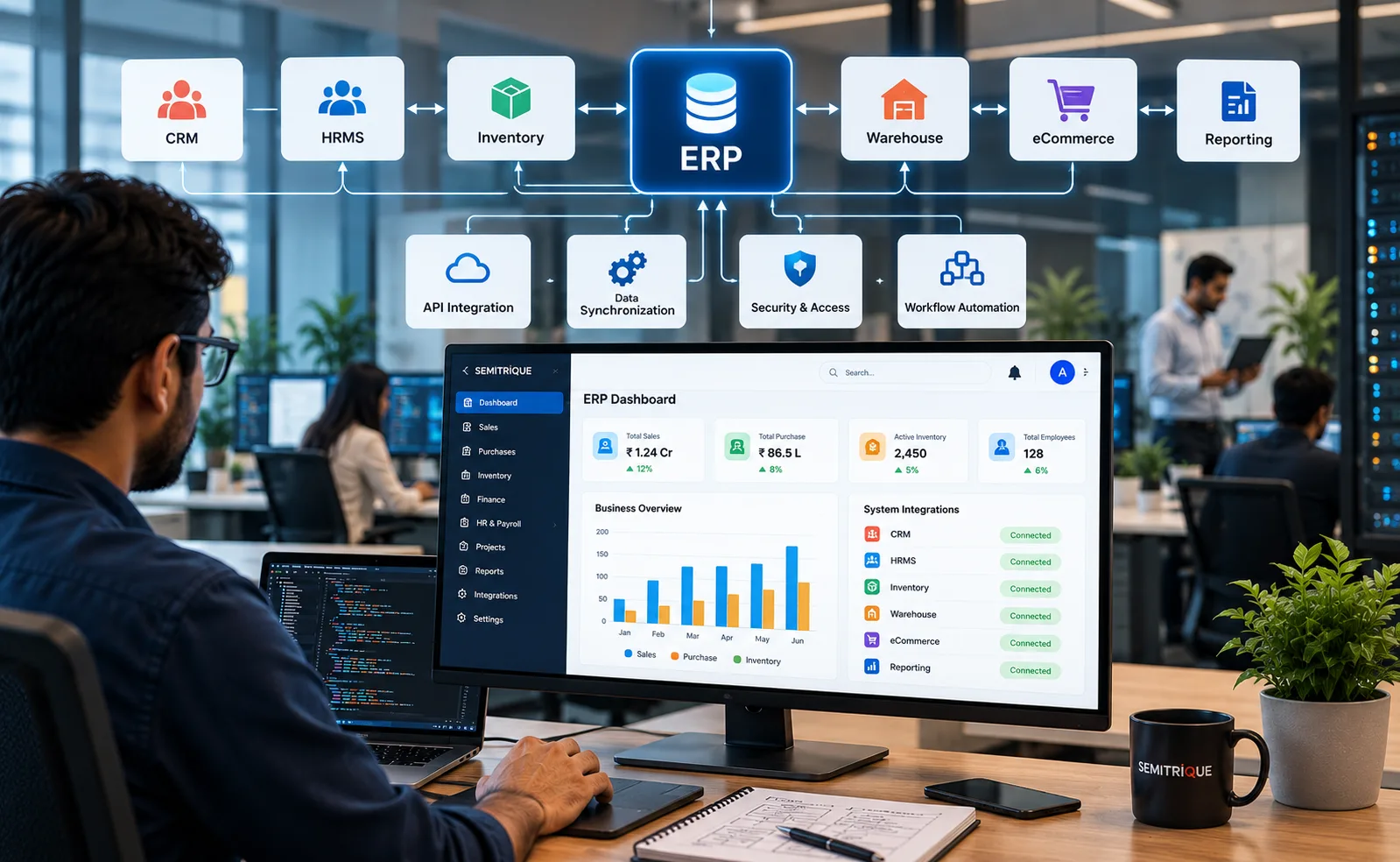
ERP & Business System Integration
ERP systems often sit at the center of important business processes, but they rarely operate alone. Customer information may exist in a CRM, employee data in an HRMS, stock information in inventory or warehouse systems, orders in an eCommerce platform, and management information in reporting or analytics tools.
When these applications remain disconnected, teams may need to re-enter information, transfer files manually, reconcile records, or move between multiple systems to understand the status of a process. ERP and business system integration creates a structured way for relevant applications to exchange data and support connected workflows.
Semitrique approaches ERP integration by first understanding the existing ERP environment, connected applications, data ownership, business processes, available APIs, synchronization requirements, security considerations, and operational dependencies. The integration architecture is then defined around how information actually needs to move between systems.
ERP Environment → System Discovery → Data Mapping → Workflow Mapping → Integration Architecture → Development & Configuration → Testing & Reconciliation → Deployment → Monitoring & Evolution
| Integration Area | Focus |
|---|---|
| ERP Platform | Understand existing modules, processes, data structures, interfaces, and integration capabilities |
| CRM Integration | Connect relevant customer, sales, account, opportunity, or service information |
| HRMS Integration | Exchange appropriate employee, organizational, attendance, or other supported workforce data |
| Inventory & WMS | Connect stock, warehouse, movement, availability, or fulfilment information where required |
| eCommerce & Orders | Exchange relevant customer, product, order, fulfilment, and transaction information |
| Procurement & Suppliers | Connect purchasing, supplier, material, or procurement-related workflows where supported |
| Reporting & Analytics | Make relevant cross-system information available for operational reporting and analysis |
| APIs & Middleware | Establish controlled communication between applications using suitable integration methods |
| Data Synchronization | Define what data moves, in which direction, when it moves, and which system owns the record |
| Validation & Reconciliation | Check transferred information and identify missing, rejected, duplicate, or inconsistent records |
| Security & Access | Apply appropriate authentication, permissions, credentials, and data-access controls |
| Monitoring & Maintenance | Review integration activity, failures, dependencies, changes, and ongoing system compatibility |
Connected ERP Ecosystem
The objective is not necessarily to move every business function into the ERP. Specialized applications may remain the most appropriate systems for particular processes.
Integration allows those applications to remain useful while exchanging the information required by the wider business environment.
CRM ↔ ERP ↔ Inventory / WMS ↔ eCommerce
HRMS ↔ ERP ↔ Procurement / Suppliers
Business Applications ↔ ERP ↔ Reporting & Analytics
The actual architecture depends on the platforms involved. Not every system should connect directly to every other application.
System & Process Discovery
Integration begins by identifying the systems involved and understanding their roles. This includes reviewing which application creates particular information, which application needs it, when it should become available, and what business process depends on the exchange.
This stage also helps identify duplicated data, manual transfers, spreadsheet dependencies, existing interfaces, and important system limitations before development begins.
Data Mapping
Two applications may represent the same business information differently. Customer IDs, product codes, employee records, order statuses, units, dates, or other fields may use different structures and formats.
Data mapping defines how information from one system corresponds with information in another.
Source Data → Validation → Transformation / Mapping → Destination System → Confirmation
Clear mapping is especially important when multiple applications depend on the same records.
Data Ownership
Integration should establish which application is responsible for maintaining important information.
For example, one system may be the authoritative source for customer records while another consumes selected customer data. Defining ownership helps reduce conflicting updates and unnecessary duplication.
A typical model may look like:
System of Record → Approved Data → Integration Layer → Receiving System
The actual system of record must be determined from the organization’s architecture and processes.
Integration Architecture
The technical approach depends on the capabilities of the ERP and connected applications. Where supported, integrations may use APIs, middleware, webhooks, scheduled synchronization, event-driven processes, database interfaces, or other appropriate methods.
Architecture decisions should consider reliability, maintainability, security, expected data volume, synchronization timing, error handling, and future system changes rather than choosing an integration method only because it is technically available.
Workflow Integration
ERP integration can connect more than records. It can also support business processes that move between applications.
For example:
Customer Order → Order Validation → ERP Processing → Inventory Check → Fulfilment Update → Customer / Connected System
Or:
Purchase Requirement → Approval → ERP / Procurement Process → Supplier Activity → Receipt → Inventory Update → Reporting
These flows are examples. The actual sequence should reflect the organization’s real process and systems.
Real-Time vs Scheduled Synchronization
Not every integration requires information to move immediately.
Time-sensitive operational processes may benefit from event-driven or near-real-time exchange where supported, while other information may be appropriate for scheduled synchronization.
The frequency should be selected according to business need, platform capability, data volume, reliability requirements, and technical constraints.
Validation & Error Handling
Successful integration requires a plan for situations where data cannot be transferred correctly. Records may fail because required information is missing, values do not match expected formats, credentials expire, APIs become unavailable, or another system rejects the transaction.
A maintainable integration should consider:
Data Received → Validate → Process → Successful? → Update Destination
If Failed → Record Error → Review / Retry → Reconcile
This creates a clearer path for investigating integration problems rather than allowing failed transactions to disappear unnoticed.
Security & Access Control
Integrations may handle commercially or operationally important information. Authentication, authorization, credential management, encrypted communication where applicable, access permissions, logging, and data exposure should therefore be considered as part of the architecture.
Only the information required for the defined integration should be made available to connected applications.
Testing & Reconciliation
Integration testing should confirm more than whether two systems can communicate. Relevant scenarios can include field mapping, validation rules, duplicate handling, synchronization direction, workflow conditions, failed transactions, permissions, and reconciliation of transferred records.
Testing should reflect the agreed integration scope and the capabilities of the connected systems.
Monitoring & Lifecycle Management
ERP ecosystems change over time. APIs can change, ERP modules can be upgraded, business rules can evolve, credentials can expire, and new applications may be introduced.
Integration should therefore be treated as an ongoing system dependency rather than a one-time connection. Appropriate monitoring and maintenance can help identify failures and support future changes to the connected environment.
Built Around the Existing Business Environment
Semitrique approaches ERP & Business System Integration around the organization’s actual ERP platform, applications, data, workflows, and technical constraints rather than assuming a fixed integration model.
The objective is to create a more connected ERP ecosystem where relevant business information can move between appropriate systems in a controlled and maintainable way—supporting clearer workflows and reducing unnecessary manual movement of data without replacing specialized applications simply for the sake of consolidation.