Customer & Partner Self-Service Portal
Businesses that regularly interact with customers, partners, dealers, vendors, or distributors often manage a large number of requests, documents, status updates, support conversations, and account-related activities.
When these interactions depend heavily on email, spreadsheets, phone calls, messaging applications, or disconnected systems, users may need to contact internal teams simply to obtain information that could otherwise be available through a secure digital portal.
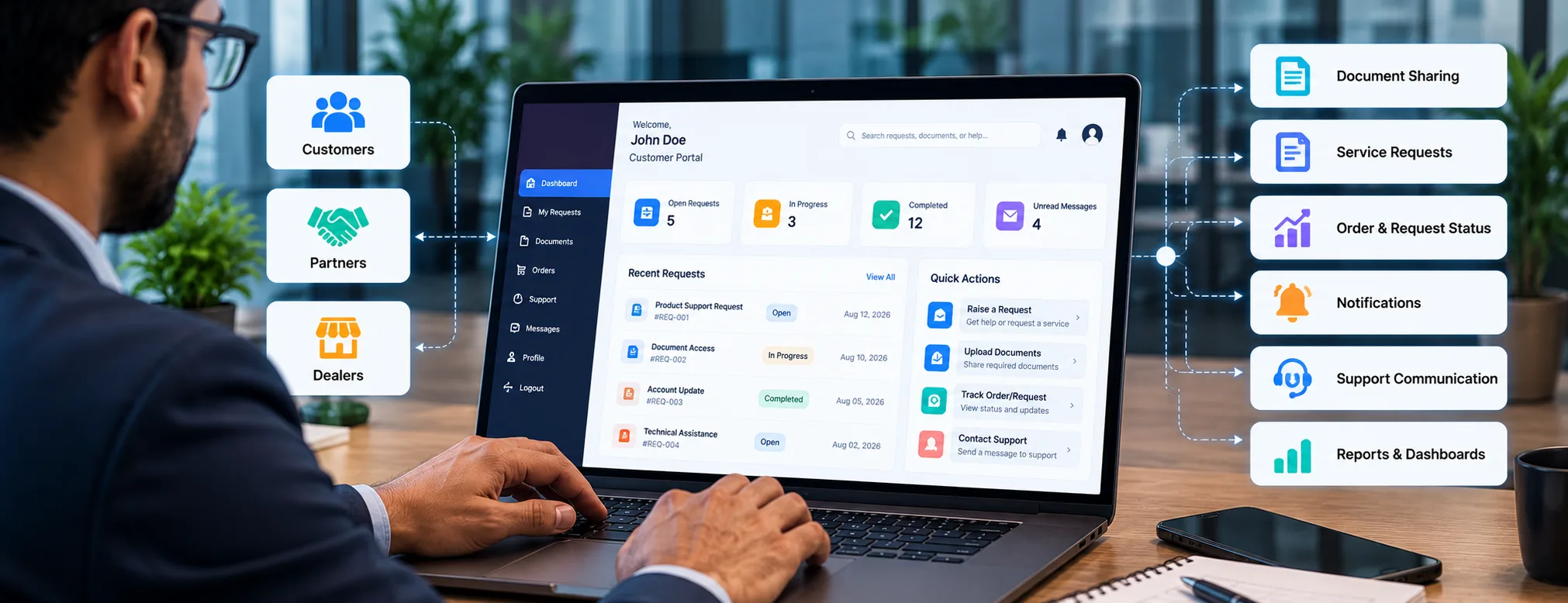
A customer and partner self-service portal provides authorized external users with a centralized environment where they can access relevant information, submit requests, exchange documents, monitor status, and interact with the business.
Semitrique approaches portal development as a custom software requirement, with functionality, workflows, permissions, integrations, and architecture defined around the actual business process rather than a fixed portal template.
What Is a Customer & Partner Self-Service Portal?
A self-service portal is a secure web-based application that gives customers, partners, dealers, vendors, or other authorized users controlled access to specific business information and digital services.
Depending on the business requirement, users may be able to:
- Sign in to their own account
- View a personalized dashboard
- Submit service or business requests
- Upload and download documents
- Check request or order status
- Receive notifications
- Communicate with support teams
- Access account-specific information
- Review previous activities
- View reports or relevant records
The portal becomes a structured digital interaction layer between external users and the organization’s internal processes.
The Business Problem a Self-Service Portal Can Address
Without a dedicated portal, external interactions can become fragmented.
A customer might email a support request, call later for an update, send a document through another channel, and then contact a different employee to check its status.
Partners and dealers may face similar problems when they need access to documents, order information, service updates, or business records.
This can create several operational challenges:
Repetitive Status Enquiries
Internal teams may spend time repeatedly answering questions such as whether a request was received, processed, approved, dispatched, or completed.
Scattered Documents
Documents exchanged through email, messaging platforms, and local files can become difficult to organize and associate with the correct user or request.
Limited User Visibility
Customers and partners may have little visibility into what is happening after submitting a request.
Manual Information Transfer
Employees may need to manually transfer information from emails or spreadsheets into CRM, ERP, or other internal applications.
Inconsistent Communication
Different employees may communicate updates in different ways, making the overall customer or partner experience less consistent.
A portal can provide a structured interface for these interactions while keeping the underlying workflow aligned with the organization’s processes.
Portal Users & Access Roles
Not every portal user needs access to the same information.
Semitrique can structure portal access around defined user roles and permissions.
Customer Access
Customers may need access to their own requests, documents, orders, support communication, account information, or service history.
Partner Access
Business partners may require additional access to shared resources, collaboration workflows, business documents, reports, or partner-specific information.
Dealer or Distributor Access
Dealers and distributors may need functionality related to orders, inventory information, product documents, service requests, status tracking, or account activities.
Internal Team Access
Employees and administrators may require a separate interface for reviewing submissions, updating statuses, managing users, assigning work, uploading documents, and handling exceptions.
Role-based access helps ensure that users see only the information and functionality relevant to their responsibilities.
Core Portal Capabilities
The exact feature set should be defined from the business requirements. A custom portal can include several functional areas.
Secure Registration & Authentication
The portal can provide controlled account access using appropriate authentication mechanisms.
Depending on requirements, this can include account creation, login, password management, account verification, session handling, and additional authentication controls.
Personalized Dashboard
After signing in, users can be presented with information relevant to their account.
A dashboard might display:
- Open requests
- Requests in progress
- Completed activities
- Pending actions
- Recent documents
- Notifications
- Order status
- Support activity
The purpose is to give users an immediate view of information that matters to them.
Service & Business Requests
Instead of relying entirely on emails or phone calls, users can submit structured requests through the portal.
Request forms can capture the specific information needed for the workflow.
Each request can receive an identifier and move through defined statuses such as:
Submitted → Under Review → In Progress → Awaiting Information → Completed
The actual stages should reflect the organization’s process.
Document Management
Customers or partners may need to exchange documents with the business.
Portal functionality can support controlled uploading, downloading, categorization, and association of documents with users, requests, orders, or other relevant records.
Document permissions should be designed carefully so users can access only authorized files.
Order & Request Status Tracking
Users can check the current state of relevant orders or requests without contacting the business for every update.
The information displayed depends on what data is available from the portal itself or connected business systems.
Notifications
Notifications can help users understand when something relevant has changed.
Depending on the implementation, notifications may relate to:
- New requests
- Status changes
- Required actions
- New documents
- Approvals
- Responses
- Order updates
- Completed activities
The notification channels and frequency should be selected according to the business requirement.
Support Communication
A portal can provide a structured location for communication associated with a request or support case.
Keeping communication connected to the relevant record can provide better context than scattered email or messaging conversations.
Reports & Dashboards
Where appropriate, users may receive access to reports or account-specific information.
Internal teams can also use reporting to understand request volumes, workflow status, pending work, response patterns, or other operational information supported by reliable data.
Workflow Management Behind the Portal
The visible portal interface is only one part of the system.
Behind it, business rules determine what happens when users perform actions.
For example, when a customer submits a service request, the system might:
- Validate the submitted information.
- Create a request record.
- Assign a unique reference.
- Route it to the appropriate team or workflow.
- Set an initial status.
- Notify the relevant users.
- Make the status available in the customer dashboard.
- Record future updates against the same request.
The exact workflow should be based on the organization’s real process.
This is why requirements engineering is important before development begins.
Connecting the Portal With Existing Business Systems
A self-service portal does not necessarily need to operate as an isolated application.
Depending on available integration capabilities, it can exchange information with existing systems such as:
CRM
Customer profiles, account information, enquiries, activities, or relevant relationship data may need to move between the portal and CRM.
ERP
Orders, invoices, account records, product information, service information, or other operational data may originate from an ERP environment.
Document Systems
Existing document repositories may need to provide or receive files through controlled integrations.
Support Systems
Requests submitted through the portal may need to create or update records within an existing support workflow.
Internal Business Applications
Organizations may already have custom applications containing information required by portal users.
APIs or other appropriate integration approaches can connect these environments where technically supported.
API & Data Integration
Portal integrations should be designed around the data that actually needs to move between systems.
For each integration, important questions include:
- Which system owns the original data?
- What information needs to be exchanged?
- Which direction should the data move?
- How frequently should synchronization occur?
- What happens when an integration fails?
- Which users are permitted to access the information?
- How are duplicate or conflicting records handled?
Depending on the environment, integration approaches may include APIs, middleware, event-based communication, scheduled synchronization, or other suitable mechanisms.
Role-Based Access & Data Permissions
A customer portal may contain information belonging to multiple organizations or users.
Access control therefore needs to be considered as part of the application architecture rather than added only at the interface level.
Permissions can be designed around factors such as:
- User
- Organization
- Account
- Role
- Request
- Document
- Department
- Feature
- Administrative responsibility
The appropriate permission model depends on the portal’s users and data relationships.
Responsive Portal Experience
Users may access a portal from desktop computers, laptops, tablets, or smartphones.
The interface should therefore be designed around responsive usability rather than assuming every interaction will happen on a large desktop screen.
Important workflows such as checking status, uploading information, reviewing notifications, or submitting a request should remain practical across supported devices.
Portal Administration
External users need a simple experience, while internal teams need sufficient control to operate the platform.
An administration interface may provide functionality for:
- User management
- Account management
- Role and permission configuration
- Request management
- Status updates
- Document administration
- Notifications
- Workflow configuration
- Reporting
- Integration monitoring
- Application settings
Administrative functionality should be limited according to internal roles and responsibilities.
Data Validation & Application Reliability
Information submitted through a portal may eventually flow into other operational systems.
Validation is therefore important.
The application can apply rules for required information, permitted formats, duplicate submissions, workflow conditions, and other business-specific requirements.
Integrations should also consider failure handling so that unsuccessful data transfers can be identified and investigated rather than silently creating inconsistent records.
Designing the Portal Around Real Requirements
A custom portal should not begin with a long list of features.
Development should begin by understanding:
- Who will use the portal?
- What do those users need to accomplish?
- Which activities currently require manual intervention?
- What information should users be able to see?
- What information must remain restricted?
- Which internal teams participate in each workflow?
- Which existing systems contain required data?
- Which integrations are technically available?
- What happens when normal workflows fail?
- Which administrative controls are required?
These questions help define the application before development decisions are finalized.
Typical Development Approach
Semitrique’s approach can be organized into several stages.
1. Requirement Discovery
Understand users, business objectives, existing processes, systems, constraints, and required portal capabilities.
2. Workflow Mapping
Define how requests, documents, approvals, status changes, and other activities should move through the system.
3. User Roles & Permissions
Determine which information and actions should be available to each type of user.
4. Application & Integration Architecture
Define the application structure, data relationships, integration points, APIs, and appropriate technology approach.
5. Interface & Portal Development
Build the user-facing portal, internal functionality, workflows, dashboards, and required application components.
6. Integration & Testing
Connect supported external systems and test functionality, permissions, workflows, data movement, responsive behaviour, and exception scenarios.
7. Deployment & Ongoing Evolution
Deploy the application according to the agreed environment and continue adapting functionality when business requirements change.
When Does a Custom Self-Service Portal Make Sense?
A custom portal can be worth considering when a business has recurring external interactions that cannot be handled efficiently through its existing tools.
Common indicators include:
- High volumes of repetitive customer enquiries
- Frequent requests for status information
- Regular document exchange
- Dealer or partner networks
- Multiple external user roles
- Complex business-specific workflows
- Information distributed across several systems
- Need for account-specific dashboards
- Existing software that does not provide the required external experience
However, custom development is not automatically the right answer.
If an existing platform already meets the business requirement without unnecessary complexity, configuring or integrating that platform may be more appropriate than developing a new application.
Potential Business Value
A well-designed portal can create value by giving users clearer access to relevant information and providing internal teams with a more structured way to manage external interactions.
Depending on the implementation, this may help reduce repetitive communication, organize request handling, improve status visibility, centralize document exchange, and connect external interactions with existing business workflows.
These benefits depend on the actual implementation, adoption, data quality, integrations, and operational processes. A portal should therefore be evaluated against specific business requirements rather than assumed to produce guaranteed outcomes.
Customer Portal vs Generic Website
A business website and a self-service portal serve different purposes.
A website primarily provides public information and supports discovery, communication, and conversion.
A self-service portal is an authenticated application environment designed for specific users, data, workflows, permissions, and transactions.
A business may use both: the public website for general visitors and the portal for authorized customers, partners, dealers, or vendors.
Customer Portal vs ERP
A portal also should not be treated as a replacement for an ERP system.
The ERP may remain responsible for core operational records and processes, while the portal provides selected external users with controlled access to relevant information or actions.
Where appropriate, integration can allow both systems to perform their respective roles while exchanging necessary data.
Build the Portal Around the User and the Workflow
The most useful self-service portal is not necessarily the one with the largest number of features.
It is the one that clearly supports the activities users actually need to complete while fitting into the organization’s operational processes.
Semitrique approaches customer and partner portal development by defining the users, workflows, permissions, data relationships, integrations, and technical requirements before determining the final application structure.
This creates a stronger foundation for a portal that can support current requirements while remaining maintainable as business processes evolve.